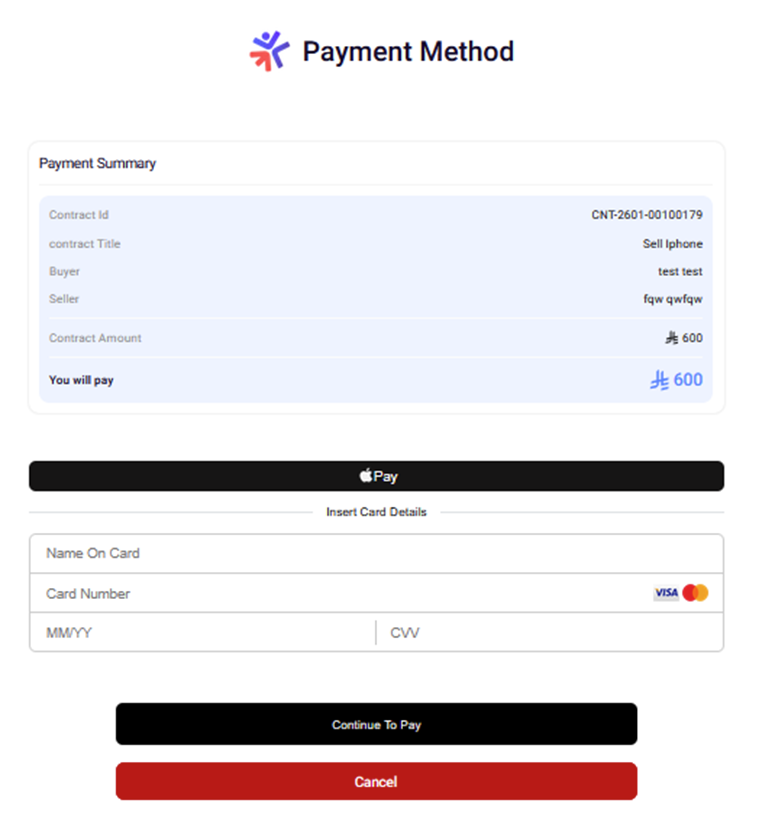
Payment Summary Screen
Overview
After completing KYC verification, you'll see the payment summary screen where you can review details and select a payment method.
When This Screen Appears
- Appears after completing all required KYC steps
- Also appears if you've already completed KYC in a previous session
1. Payment Summary Card
Contract Details:
- Contract ID: Your unique contract identifier
- Contract Title: Name of your contract
- Buyer: Your name (from Personal Info step)
- Seller: The seller's name
Financial Information:
- Contract Amount: The base amount of the contract
- You Will Pay: Total amount highlighted in blue (larger font)
2. Payment Methods Section
Below the summary, you'll see available payment options:
Supported Payment Gateways:
- Credit/debit card payments
- STC Pay**: STC Pay wallet
- Mada**: Mada card payments
- Apple Pay**: Apple Pay (if available)
How to Proceed
- Review all contract details carefully
- Verify the total amount you'll pay
- Select your preferred payment method
- You'll be redirected to the payment gateway's secure page
- Complete payment on the gateway's page
- After successful payment, you'll be redirected to the Payment Success screen